两种方法:
There are two methods:
1.直线工具
1. Straight line tool
设置scale以后。
按照目测直径逐一 拖一下,每次都ctrl+M。适用于比较小,圆形的颗粒。
After setting the scale in Analyze, choose each particle’s diameter by straight line tool. Ctrl+M to record the value. This method is suitable for the little round particles.
2.椭圆
2. Elllipse tool
i.选取
i.choose particles
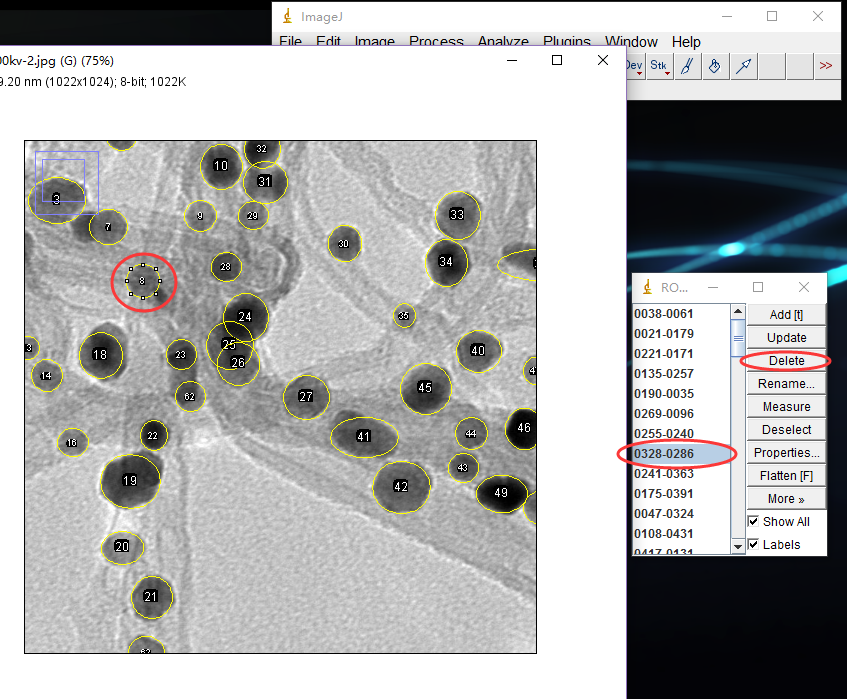
用椭圆工具选中一个颗粒,调整至合适的大小,尽量和颗粒的大小相近。然后ctrl+T,调出统计面板,面板上的show all 最好勾选,可以知道哪个统计过了。
如果不满意某个,点一下那个圆,面板上Delete。
Choose the particles with ellipse tool, ctrl+T to record the particle on the panel. The ellipse should be close to the real particle as possible. Check “show all” in the panel to show the recorded particles. Click “Delete” to remove the chosen ellipse.
阅读更多。